

🤖 August: Human + AI
You asked for it (89% of you, in fact). So here's how our team uses AI with Todoist.

It’s August, which in my house means the kids are off school, the calendar has gone feral, and any kind of sanity-saving routine is well and truly out the window. If yours looks anything similar… solidarity, my friend. 🫠
It feels like the right month to talk about how to lighten the load. A while back I ran a poll asking if you wanted more AI chat in these newsletters, and 89% of you said yes. (The other 11% – I see you… This is not our only topic now, I promise).
So given that my brainspace is limited, and you’ve loved hearing from them before, I thought I’d call on the trusty Todoist team to offer their AI use case wisdom. I asked: How do you actually use AI with Todoist? And I challenge you not to get teary-eyed at the last one.
How our team uses AI with Todoist
To copy any of these ideas, connect Todoist to Claude or ChatGPT via our official connectors, so the AI can safely read and write to your task list. You don’t need to be technical at all. And you definitely don’t need to build what some of these lovely nerds have built. Take what you want and leave what you don’t. This may just get the cogs turning. ⚙️
Paweł // the self-building grocery list. Paweł points Claude at a handful of recipe links, and it adds the ingredients as subtasks under his shopping task in Todoist. As he adds recipes, it merges duplicates, so “2 tbsp lemon juice” and “1 lemon” become, sensibly, “2 lemons.” Each item even links back to its recipe, so if something’s out of stock, he knows what it was for and can pick a decent substitute. 🍋
Alex // the home-project shopping list. Alex was standing on his balcony looking at walls that needed a fresh coat of paint, with no clue what to actually buy. Instead of opening ten browser tabs, he described the job to ChatGPT, and it added a proper materials list straight into Todoist. A much better solution than another vague “sort the balcony” task.
Brenna // meal planning, end to end. Brenna built a meal-planning routine that reads the week’s grocery-store deals, cross-checks the meals she’s already made recently (avoiding repeats), proposes four dinners built around whatever protein is on sale, and then drops the whole shopping list into Todoist, all sorted into store-aisle order so she’s not wandering the aisles like a pinball with a shopping cart. A genius use case I’ll for sure be copying.
Amir (our CEO) // weekly updates, mostly automated. Every week, everyone working at Todoist posts a short written update (yes, even the CEO): what I got done, and what I’m focused on next. It’s our async version of a weekly stand-up, minus the meeting. Amir labels his relevant tasks as he goes through the week, then has AI pull them together into a perfectly formatted written update to share with the team.
Panos // the assistant that already knows. Capturing a task usually comes with some mental gymnastics: which project does it go in, who’s it for, when’s it due. Panos’s AI understands how he works; “find the order confirmation in my inbox and make a task for my wife to grab the package” is all it takes. That task turns up assigned to her, filed in the right project, deadline set, with the context in the notes.
Henning // a bookend to the day. His AI reads his agenda before meetings to prep him, adds follow-up tasks he’d otherwise forget. It also gives him a morning brief, and an evening debrief of what got done (and what didn’t). Sounds like a chill way to start and finish the day. 😌
Luis // one briefing to rule them all. Luis gets a daily briefing that pulls from everywhere his work lives (messages, Todoist, GitHub, email). It sorts out the context, files the actionables into the right projects, and writes his weekly update including what he got done and what’s next.
Juan // a gym buddy that has all the context. Juan connected a project to his health and fitness apps alongside his Todoist “Gym” project. When he’s short on time, sore, or just has a question, he talks it through, and it adjusts his workout plan. Juan then has a plan that flexes with what the week really looks like.
Gonçalo // the household steward. When someone rings his doorbell, AI describes who’s there out loud – “an older man with glasses and three children,” “a courier with a package” – so the family knows who’s at the door without getting up. Naturally, a colleague immediately asked whether it would announce “Batman is at your door” if someone showed up in costume. Gonçalo’s reply: “There’s only one way to find out.” 😆
You’ll spot a theme running through all of these. The most beneficial flows are the boringly practical ones, like meeting prep, follow-ups, a morning brief, a shopping list.
We tend to want to overcomplicate where AI can alleviate the load, but actually a few very small workflows can make an enormous difference.
The one with heart 💛
I want to give this one its own section, because it’ll stay with me for a long time.
Melis uses a Todoist project to track everything for her dad (who lives with a permanent brain injury):
His medications as recurring tasks with the doses in the description.
Appointments with their own prep checklists.
A running journal of therapy sessions and symptoms.
Before he sees a doctor, she asks AI to pull it all together into a summary sheet, including what they want to ask next. Ten-minute consultations are brutally short when you’re trying to convey months of care from memory.
Now she or her Mum can attend every appointment with a clear, reader-friendly summary.
Melis kindly gave me permission to share an anonymized version of what her care summary looks like, so you can see the shape of it (all personal details are made up here, for obvious reasons):
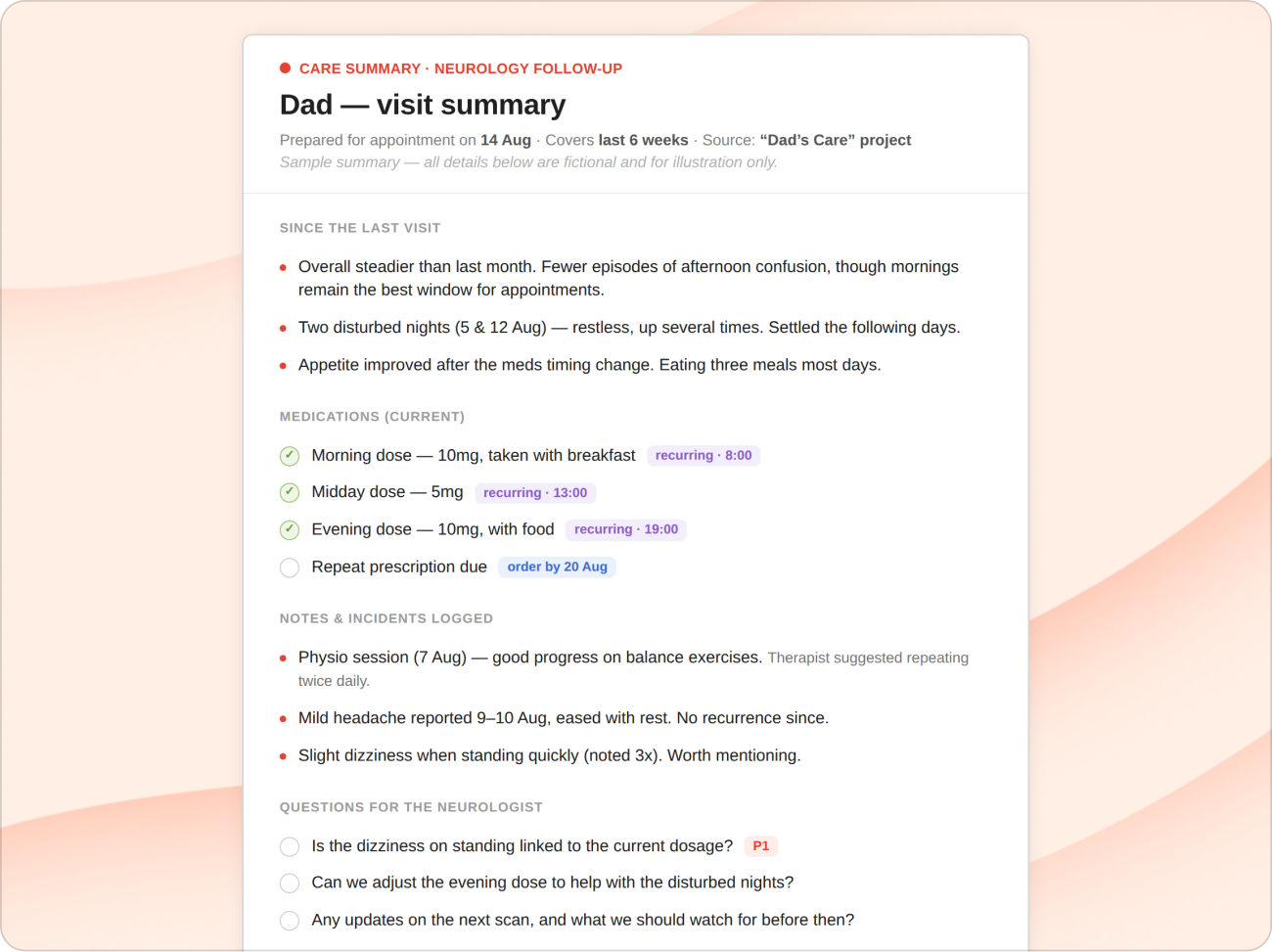
For me, this example captured the whole spirit of this topic. Because the last thing we want to preach is productivity for its own sake.
The workflows you put in place should take something off your shoulders or free up your mind so you’ve got more to give to the people who matter.
Melis, thank you for allowing me to share your sweet and thoughtful reminder. 🙏
“The real problem of humanity is the following: we have Paleolithic emotions, medieval institutions and godlike technology.”
E. O. Wilson, Biologist
Over to you 💬
This whole edition came from one question asked to the team. So I’d love to turn it around.
How do you use AI with Todoist? The serious time-savers and the silly delight-makers are equally welcome. Feel free to reply, or drop it in the comments, and I’ll gather the best of them for a future edition.
If you think your use case isn’t sophisticated enough, I challenge you to share it anyway. Someone reading will get value, I’m certain.
And if AI isn’t your thing at all? That’s completely fine. Whether it’s a slick AI briefing or a single task called “Start work”, the best productivity system is still the simplest one you’ll actually use.
That’s it from me this month. I came into this edition running on fumes, and I’m leaving it feeling buoyed. Partly by the ingenuity above, but mostly by the care underneath it.
Whatever kind of month you’re having (full calendar, quiet one, or somewhere in the messy middle), be kind to yourself. Offload whatever you can. You don’t have to carry it all alone.
See you in September. 👋
Naomi (🙋♀️real human) and the Todoist team
If you found today’s topic helpful, consider sharing it with a friend. And if you are said friend reading, then welcome! We’d love to have you stay.👇
Even after a lifetime of using to-do lists, I'm still guilty of aspirational planning and scheduling too many tasks for a given day. I used Claude to build a dashboard to help me look forward in my planning.
I have four high-level project areas: Creating (I'm a musician), Life (personal, home financial), Managing (music business tasks I want to keep separate from creating), and Routine (personal and household tasks and reminders). My tasks are labeled by estimated time: 5, 15, 30, 60, 120 minutes.
My Claude dashboard shows for the next three days:
- the number of tasks in each time label (columns) across each project area (rows)
- the total time for each project area
- the total time for the day.
It's very handy and it's helping me break my bad planning habits.
That's fantastic, thank you for sharing! is it in anyway possible to get more details on some of these use cases? the one of Amir, Brena & Panos are especially Bangers !