

📫 April: Triage
It’s not inbox zero. It’s zero attention on your inbox.

After last month’s newsletter, the comments were full of one request: go deeper on inbox triage and prioritization. So here we are.
Full disclosure: I’m writing this because I looked at your comments and thought, same. Collette said she’s drowning. Tracey is coming up for air after too many 10-hour days. Melissa is juggling internal priorities alongside industry expectations. I read every single comment, and I felt very seen.
So let’s figure this out together.
First, the research
Our inboxes aren’t storage. They’re a queue for our attention.
After all the research I did, this line scratched my brain in a way I didn’t know I needed.
And “the inbox” isn’t even one place anymore. It used to be a physical tray on your desk. Now it’s email, plus DMs, voicemails, and messages on aaalllll the platforms. I’m not even going to pretend there’s a fix for that. It’s us versus every big tech company out there.
And speaking of big tech: our inboxes are cognitively not much different from a slot machine.
Variable reward systems (where sometimes you pull the lever and get something exciting, and sometimes you get nothing) are the same mechanism that makes gambling compelling. Inboxes work exactly the same way. It’s hard for the brain to resist checking, out of anticipation for something wondrous or fear of a threat.
And underneath the volume and the addictive design is something even harder to shake: your inbox is full of other people’s requests of you. Every unread message is someone waiting. Every little thing you’ve seen but not replied to is a tiny outstanding debt. And most of us (whether we’d admit it or not) have a very hard time sitting comfortably with the idea of letting people down. So we check. And check again. 🙃
The annoying “It depends” part
“So what do we DO?!”
Stick with me here. Good triage is different for every single person reading this, and I’d be selling snake oil if I told you otherwise.
Ben, in the comments, is in IT escalation. His inbox is a live emergency channel. The advice “just check it twice a day” would probably get him fired. Someone else reading this might have one, relatively calm inbox with no time urgency and a completely different bottleneck.
The variables that shape your triage are things like: your role, your incoming volume, your company’s urgency culture (does “ASAP” in your world mean 10 mins, or by the end of the week?), and how many places your work actually lives.
So rather than prescribe a system that won’t work for half of us, let me give you the one thing the research is pretty unambiguous about.
The one thing that applies to almost everyone
Check less often than you currently do.
That’s the key finding. Studies consistently show (ref & ref) that people who check their inboxes at scheduled times report lower stress than people who check continuously. The more often you check, the more context-switching you do, and the more your focus gets chopped into pieces too small to do anything meaningful with.
Now, if you’re Ben (with a live emergency channel), “check less” is a lever only you know when to pull. But for the vast majority of us, the frequency with which we check has crept up way beyond what our role actually demands. We’re likely not checking because we have to; we’ve just trained ourselves to want to. So before you dismiss the advice, ask yourself how often you need to check in and how that compares with how often you do.
The enemy, it turns out, is an always-open inbox, rather than a full one.
I’ll admit this is something I’m still genuinely working on. The slot machine thing is real for me. I’ll have a perfectly good focus block going and then check my inbox because of what can only be described as muscle memory. 🫠 There’s something almost soothing about checking. It feels productive, even when it isn’t. Even when it actively costs me time and attention.
What’s helped me is treating my triage like the launchpad task I talked about last month. A deliberate, time-boxed activity, rather than a background hum that’s always running.
A simple triage framework (and how to adapt it to your life)
When you do check your inboxes, regardless of whether that’s twice a day or five times, here’s a framework that keeps you from drowning. The TL;DR is never check just for the sake of it.
Decide once, immediately. Every message gets one outcome the first time you touch it (really, the first time!):
🗑️ Delete or archive (preferable – if there’s nothing to act on)
💌 Reply now (if it genuinely takes under two minutes)
📌 Defer to a task with a time block (if it needs more attention)
🤝 Delegate (if it’s not actually yours to handle).
Remember this list of actions is a muscle to build, so make note of them where you need to – for me, that’s now the description on my daily “Start Work” Todoist task. And speed counts here. You could waste hours on this. Triage as fast as you can.
In a comment on my Substack note, Arjan mentioned moving away from “inbox zero to zero attention on your inbox”, which I thought was genius.
Batch it. Pick two to three windows in your day where you process the piles. Outside those windows, close it. If your role allows for this even partially, it’s worth protecting.
Set the boundary. This is the bit from last month that still applies: anything that takes longer than two minutes doesn’t get done during your triage. It becomes a Todoist task with a time block. Otherwise, one “quick” reply at 9 am turns into three hours of firefighting and a vague sense that the day got away from you.
I know that feeling, and that feeling knows me.
If you made it through this email mentioning the word “inbox” over and over without checking your inbox. Well done! 👏 For me, it’s like a Pavlovian response. Like when I read the word “News”. The impulse to then check it is intense. 😅
The reality is that we’re not moving to a world of less input and information any time soon. So how can you create a rhythm that allows you to make peace with the process and accept your own efforts as enough?
“A wealth of information creates a poverty of attention.”
Herbert Simon, economist and cognitive scientist
Speaking of triage…

One way to spend less time in your inbox is to automate away the stuff that shouldn’t need your attention in the first place.
Yes, we know it’s April 1st. No, this isn’t a prank. 😆
We’ve been tinkering on something for exactly that. Todoist Automations lets you describe what you want to automate in plain language with zero complicated setup, and it just… builds and does it. So if intimidating tech got in the way of eliminating annoying manual work, you can now do it confidently.
Things you can do related to our topic today: “when I star an email in Gmail, create a task in Todoist to follow up, and then archive the email”. Or: “send me a weekly digest of my unread email newsletters with each of their unsubscribe links”.
We’re obsessed with making things like this feel effortless.
500+ people have already tried the Automations alpha. Want to see what all the fuss is about?
Todoist Tip 💡
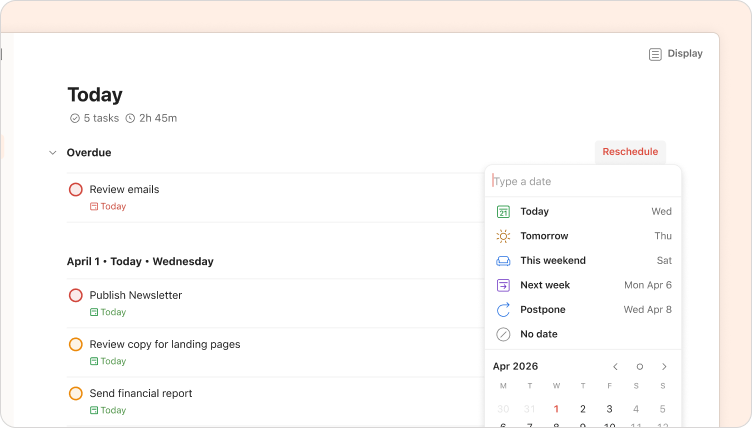
If you open Todoist to find a column of overdue tasks staring back at you 👻 (don’t worry - it happens to us all), there’s a faster fix than rescheduling one by one.
In your Today view, overdue tasks appear at the top. Above them, you’ll see a “Reschedule” option. Use it to move everything to a more realistic day. No more starting your morning already feeling behind. 😮💨
Not to brag, but I’ve set up an Automation that reschedules all my overdue tasks to today automatically, so I never have to face that pile in the first place. We’re hoping to get it in your hands soon!
And while you’re thinking about all the things clogging your attention: what’s the one task you’d automate first if you could describe it in plain English? I’m genuinely curious.
Have a good April, folks.
See you in May.
Naomi (real human 🙋♀️) and the Todoist team
Thanks Naomi, great information once again. Ive been using the Xero Inbox method for a while and its working. My inbox used to be a storage box but not anymore :) Its a great feeling of satisfaction when your inbox is empty. However any email that I thought to be important was moved to my "Action This Day" folder. Guess what was happening.... Yes the number of emails was getting bigger! I was now clearing my inbox daily, first thing but I wasn't going back to deal with the important stuff! After some thought and looking at what was in this Action folder, many didn't need to be felt with at all! Ive created a new folder "Of Interest", so when I sort my Inbox anything that I think Id like to look at but doesn't need dealing with today, now goes into "Of Interest". Once again Im feeling more relaxed about my email accounts. I still need to make a habit of going back to deal with the "Action This Day" contents. Do you have any tips?
This is great, but the one thing NO one ever mentions in inbox triage, and is also missing in your four steps: *what about newsletters?* Your message that I was literally reading from within my inbox did not fit into any of those four categories – it doesn't need a response or delegating, I can't delete/archive until I've read it, and I don't want to send all my newsletters to my task system for general reading. So where do they go?